
Free software for prehospital blood transfusion
Plan a blood program. Review every transfusion. Collect regional data.
HemeCast does all three from the NEMSIS records your ePCR system already exports. It checks every encounter against a prehospital transfusion protocol and lines up the patients who qualify.
-
1Considering a program
Estimate how much blood you would give
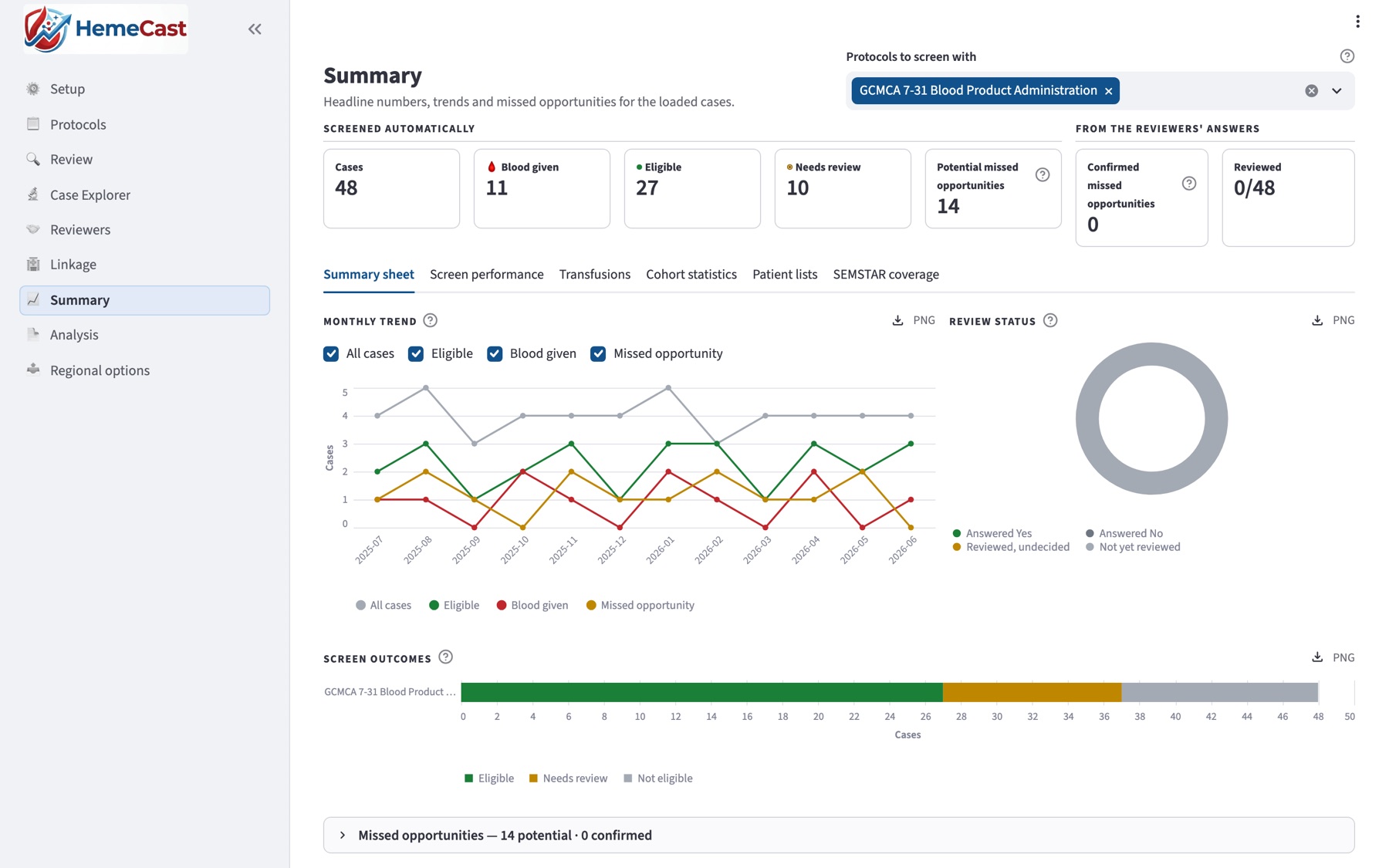
Screen a year or more of your own records against the protocol you are weighing, and count, month by month, the patients who would have qualified.
Planning → -
2Already carrying blood
Run QA/QI on every transfusion
A physician reviews each transfusion, and each patient who qualified but received none, against your protocol. HemeCast turns the reviews into QI reports.
Quality review → -
3Running a regional program
Collect regional data, SEMSTAR included
Agencies send what their NEMSIS exports already hold, plus the SEMSTAR elements their reviews add. The site checks every record, raises queries and reports for the region.
Regional data →
- Free, and we help you set it up
- Validated against physician review
- In use today
- Local: runs on your own computer
How it works
From an ePCR export to the patients who qualify
Load your records
Import the NEMSIS exports from your ePCR system, one file or a ZIP of many.
Screen against your protocol
Each encounter is checked criterion by criterion: vital signs, shock index, impressions, injury fields and the narrative.
Review and report
Physicians record their answer and the SEMSTAR data elements. HemeCast turns the reviews into summaries, reports and exports.
Each encounter gets one of three results:
- Eligibleevery requirement met
- Needs reviewnothing failed, a value is missing
- Not eligiblea requirement fails
1Considering a program
Estimate how much blood you would give
Before you commit to carrying blood, run your own records through the protocol you are considering. The patients who would have qualified give an estimate built on your agency’s own calls, not another region’s.
Count the patients who would qualify
Load a year or more of NEMSIS exports. HemeCast screens every encounter and counts, month by month, the patients who meet the protocol and those who need a closer look.
Compare protocols before you adopt one
Start from a bundled example or encode your own, then compare versions on the same records to see how a threshold changes the number of patients.
Plan around those patients
See their ages, call types and transport times, to plan the program and estimate how much blood it would use.
2Already carrying blood
QA/QI for every transfusion and every missed opportunity
Load each month’s NEMSIS exports. HemeCast lines up the patients who received blood and those who met the protocol without it, for a physician to review, and turns the reviews into quality reports.
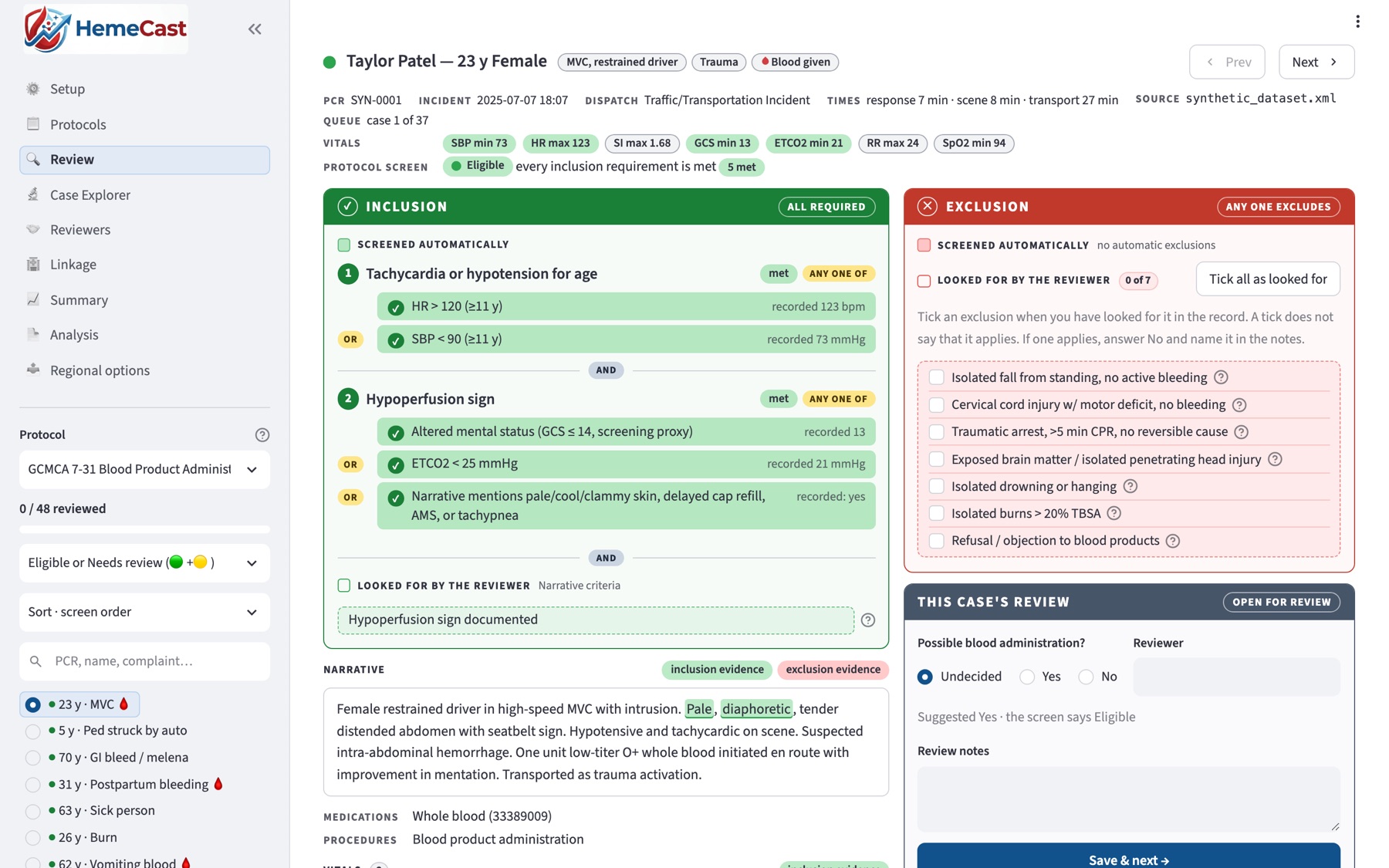
Review each case against the protocol
Criterion by criterion, with each recorded value and the signs the narrative affirms marked: “no pallor” does not count. Answers start on Undecided, with the screen’s suggestion beside them.
Catch missed opportunities
Patients who met the protocol but received no blood are flagged, and the ones a physician confirms are counted month by month.
Optional AI that stays local
A language model on the same computer can answer the narrative questions and quote its evidence for the reviewer to check. It is off by default.
See the results on one page
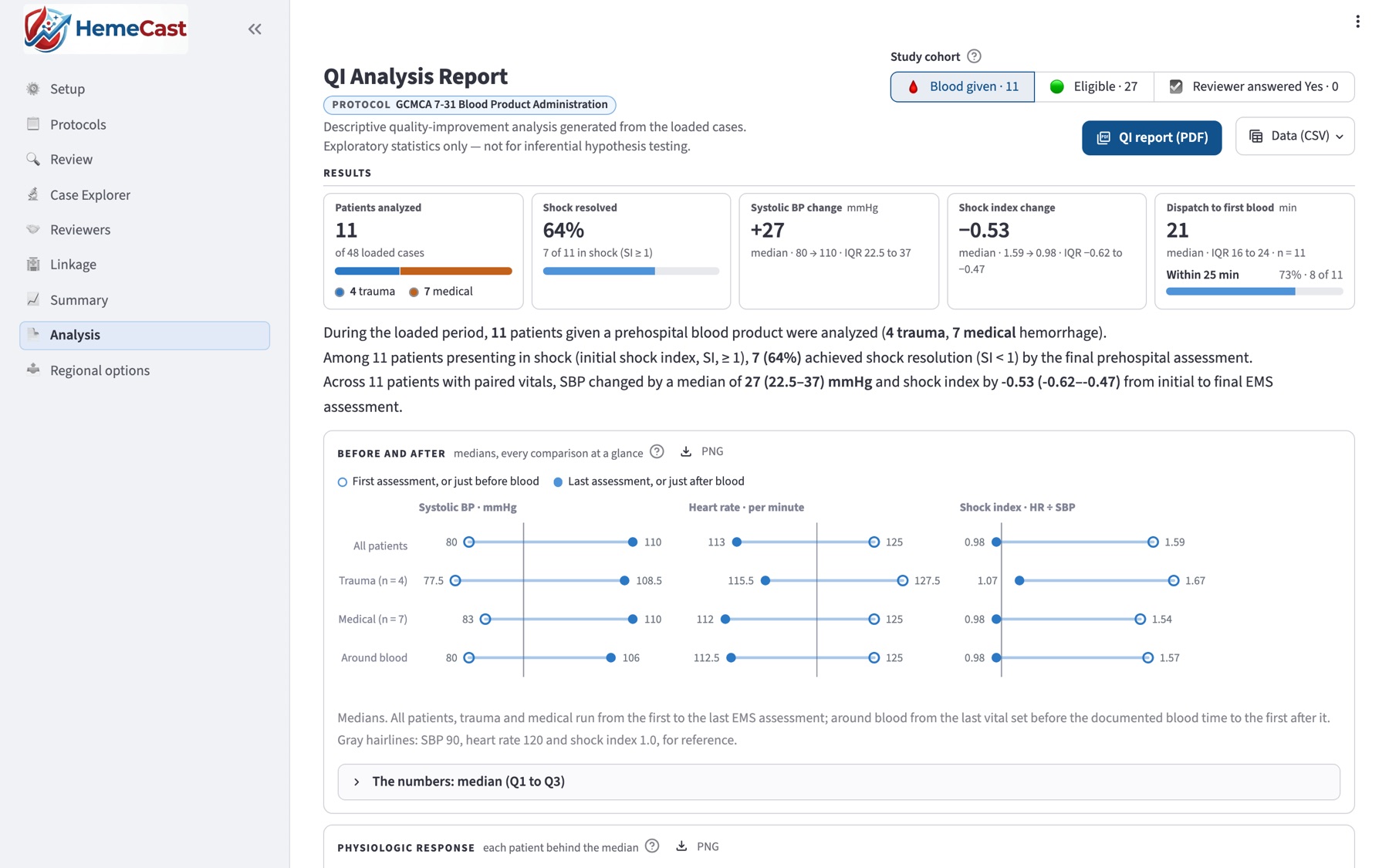
Shock resolution, the change in systolic pressure and shock index, the vital signs before and after blood, each patient’s own response, and time to blood against 15, 20 and 25 minute benchmarks, for all patients or trauma and medical apart.
Report and follow up
One click makes the print-ready QI report. Patient lists, an Excel workbook and hospital outcomes linked from your trauma registry support the follow-up.
3Running a regional program
Collect regional data, SEMSTAR elements included
Built from the NEMSIS files agencies already export, with no second form to fill in. Each agency loads its exports into its own copy of HemeCast, reviews its cases, and sends the site one file: the records it already has, plus the SEMSTAR elements its review adds.
SEMSTAR, built in
The SEMSTAR project (Standardized EMS Metrics for Survival in Transfusion and Advanced Resuscitation) defines data elements for evaluating prehospital transfusion programs. HemeCast carries the SEMSTAR dictionary, and reviewers record the elements as they review. A region requires the core tier of 86 elements, or a list of its own, and the site can raise a query for any that a record is missing.
The agency exports NEMSIS
Its ePCR system’s NEMSIS export, as it is. Nothing is typed in again.
The agency reviews and builds a file
The review adds the physician’s answer and the SEMSTAR elements the region asks for. The file holds transfusions only, or transfusions and candidates.
The site imports and checks
The site takes in the file, checks every record, raises queries back to the agency, and reports across the region.
Two data tiers
An agency sends either a Limited Data Set under a data use agreement, for research, or a de-identified file with year-month periods, or years only.
No free text leaves an agency
Records are built from a fixed list of fields. Record keys are random tokens, never a hash of patient details, and reviewers travel as codes.
Quality control and queries
The site checks each record as it arrives and can raise a query on any missing element; the agency answers in its next file. The agency’s review stays the review of record.
Regional reports
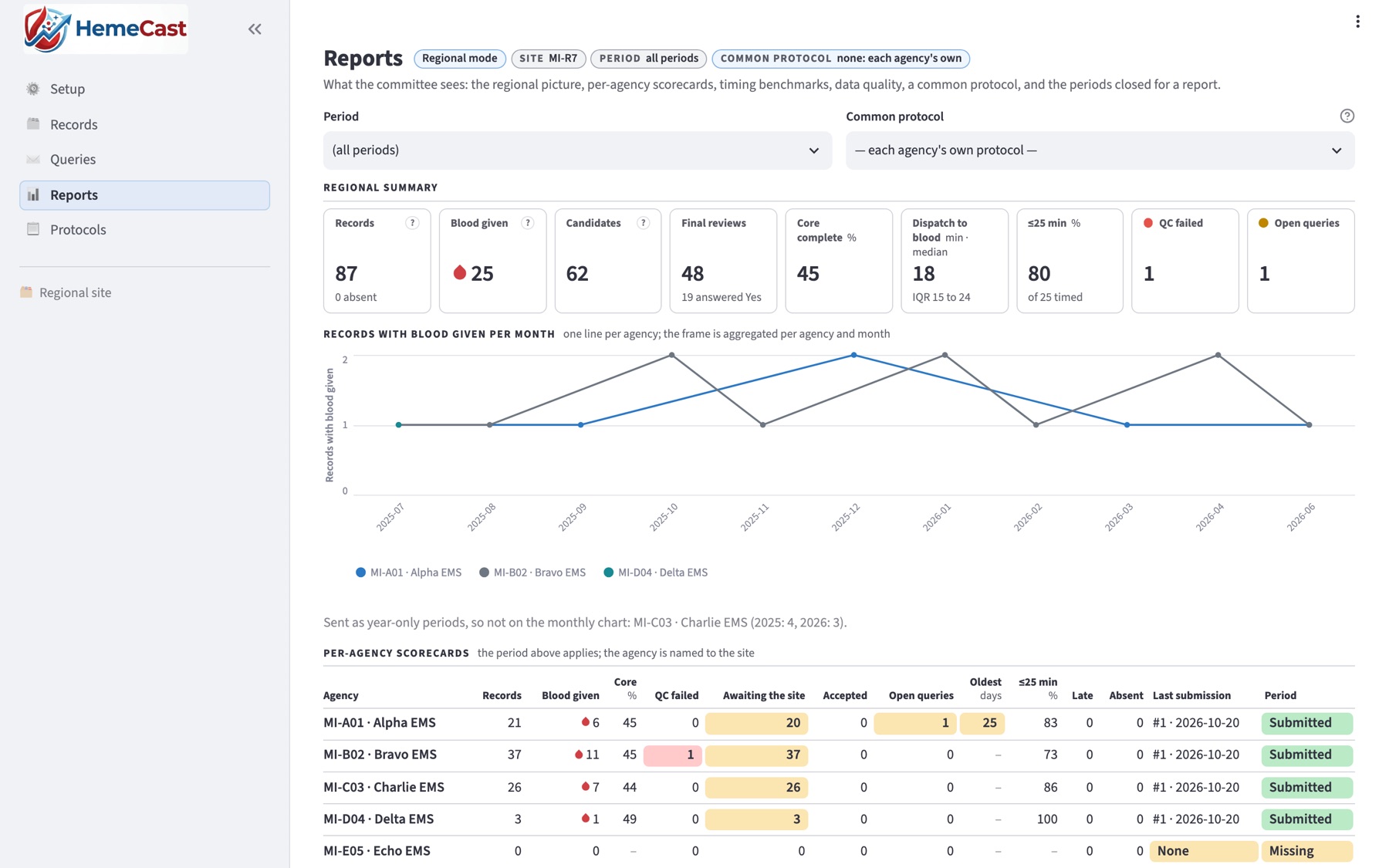
A regional summary, per-agency scorecards, time to blood, data completeness, one common protocol applied across agencies, and a feedback PDF for each agency that names its peers only by letter.
Stays at the agency
- Patient names, addresses, record and incident numbers
- The narrative, chief complaint and every other free text
- Review notes, AI quotes and hospital documents
- Reviewer names
- Dates and clock times, unless the agency sends a Limited Data Set
Sent to the regional site
From the NEMSIS export
- Age (capped over 89 in a de-identified file), sex, race and the period
- Coded fields: injury, dispatch complaint, cardiac arrest, products, medications, procedures
- Vital signs, and time intervals in minutes
Added at the agency
- The protocol screen’s results and the physician’s answer
- The SEMSTAR elements the reviewer recorded
- A random record key and a reviewer code
Privacy
Built to keep patient records where they already are
Runs on your computer
Only the computer it runs on can open HemeCast, and it sends no usage statistics.
Sends nothing by itself
A regional submission is a file the agency downloads and sends by the channel agreed with its site.
AI on the same machine
The optional model runs locally, and by default narratives have identifiers removed before they reach it.
Windows and macOS
Start it with a launcher on the reviewer’s own computer. No cloud account or sign-up is needed.
Free · validated · in use today
Set up HemeCast at your agency or region
HemeCast is free. Write to us and we will help you set it up: install it on your computer, encode your protocol and load your first NEMSIS exports. For a regional program, we also help prepare the one setup file each agency receives, carrying the region’s protocol and the SEMSTAR elements it requires.